A Guide to Control4 for Architects, Builders, & Designers
Why Integrated Automation Belongs in the Plans, Not the Punch List
It’s unfortunately all too common – a ‘smart home’ that relies on five apps to control five separate systems. Lighting lives in one interface, security in another, audio in a third. It works, but it never feels cohesive.
Control4 solves this confusion at the foundation level. It brings lighting, climate, audio-video, security, and access control into one system with one interface. The homeowner taps “Goodnight,” and the house responds in sequence: lights dim, doors lock, thermostats adjust, and shades lower.
For specifiers like architects, builders, and designers, that consistency matters. Here’s why (and how) you should incorporate Control4 automation into your future projects.
What Control4 Integration Looks Like in Practice
A whole-home automation system is most effective when it’s designed alongside the house’s architecture, not added on after. Here’s how that plays out across core systems:
- Lighting & Shades: Scenes replace banks of switches. A “Dinner” scene dims overhead lights, highlights millwork, and lowers shades without visual clutter on the wall.
- HVAC: Climate responds to season and time of day. No manual adjustments room by room.
- Security & Access: Locks, cameras, and alarms live in the same interface as lighting and AV. Homeowners check status at a glance, not across multiple apps.
- Audio & Video: Media follows the homeowner from room to room. No reconnecting, waiting to pair, or delays.
- Whole-Home Scenes: “Away” turns off lights, arms security, adjusts HVAC, and closes garage doors in one command.
This is where the system shifts from convenience to expectation. The home feels responsive because everything is working together.
Why Piecemeal Systems Fall Short
It’s common to see projects start with good intentions: add a smart thermostat here, a few wireless speakers there. Over time, those decisions stack up. Now the homeowner manages:
- Multiple apps and logins
- Inconsistent user experiences
- Devices that don’t communicate reliably
- A network that wasn’t designed for scale
That friction shows up daily. Something as simple as turning off the house becomes a tedious process. A single platform like Control4 avoids that fragmentation. It creates a predictable, repeatable experience across every system.
The Right Time to Bring Integration Into the Project
This is where many projects miss the mark. By the time walls are closed, your options narrow. You’re working around structure instead of within it. That limits what’s possible with lighting control, keypads, speaker placement, and network infrastructure.
Early coordination allows for:
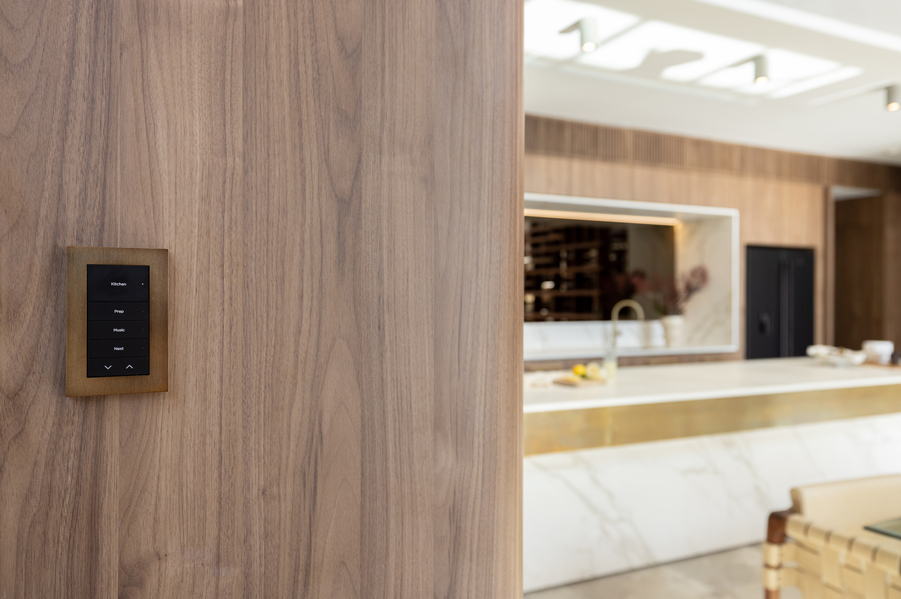
- Clean keypad layouts instead of cluttered switch walls
- Prewiring for in-wall/in-ceiling audio and surveillance
- Centralized equipment locations that stay out of sight
- A network designed to support the entire property
It also protects your design intent. Technology disappears into the home rather than causing distractions. We regularly collaborate with architects, builders, and designers at the plan stage to align system design with the space itself. That’s where the best outcomes happen.
Plan the Experience, Not Just the Technology
A Control4 system works best when it’s treated as part of the home’s infrastructure alongside electrical, HVAC, and lighting design. We work with the client to define how they’ll live in the space:
- How should the home respond in the morning?
- What happens when they leave?
- How should lighting shift throughout the day?
From there, the system becomes straightforward. The technology supports the homeowner’s lifestyle, not the other way around.
Bring Integration Into the Conversation Early
The homes that feel effortless are the ones where nothing was left to chance.
If you’re designing or building in the Denver area, involve Electronic Integration early in the process. We’ll coordinate with your team to ensure the technology aligns with the architecture and stays visually quiet.